Forms Built From A Sentence, Completed Where Work Happens
MangoApps Forms is a complete form-building platform — AI authoring from conversation, PDF, or template, drag-and-drop builder with 25+ field types, conditional logic, multi-step approvals, and ActionCue integration that routes submissions into the daily work an employee already does.





What Forms Helps You Do
Author With AI
Describe what you need ("Hardware request form with manager approval and IT routing") and Forms generates the full schema — fields, validation, logic, approval steps.
Convert PDFs
Upload an existing PDF form and Forms detects fields, builds a digital version, and lays out logic. Hand-built PDFs become live forms in seconds.
Build Visually
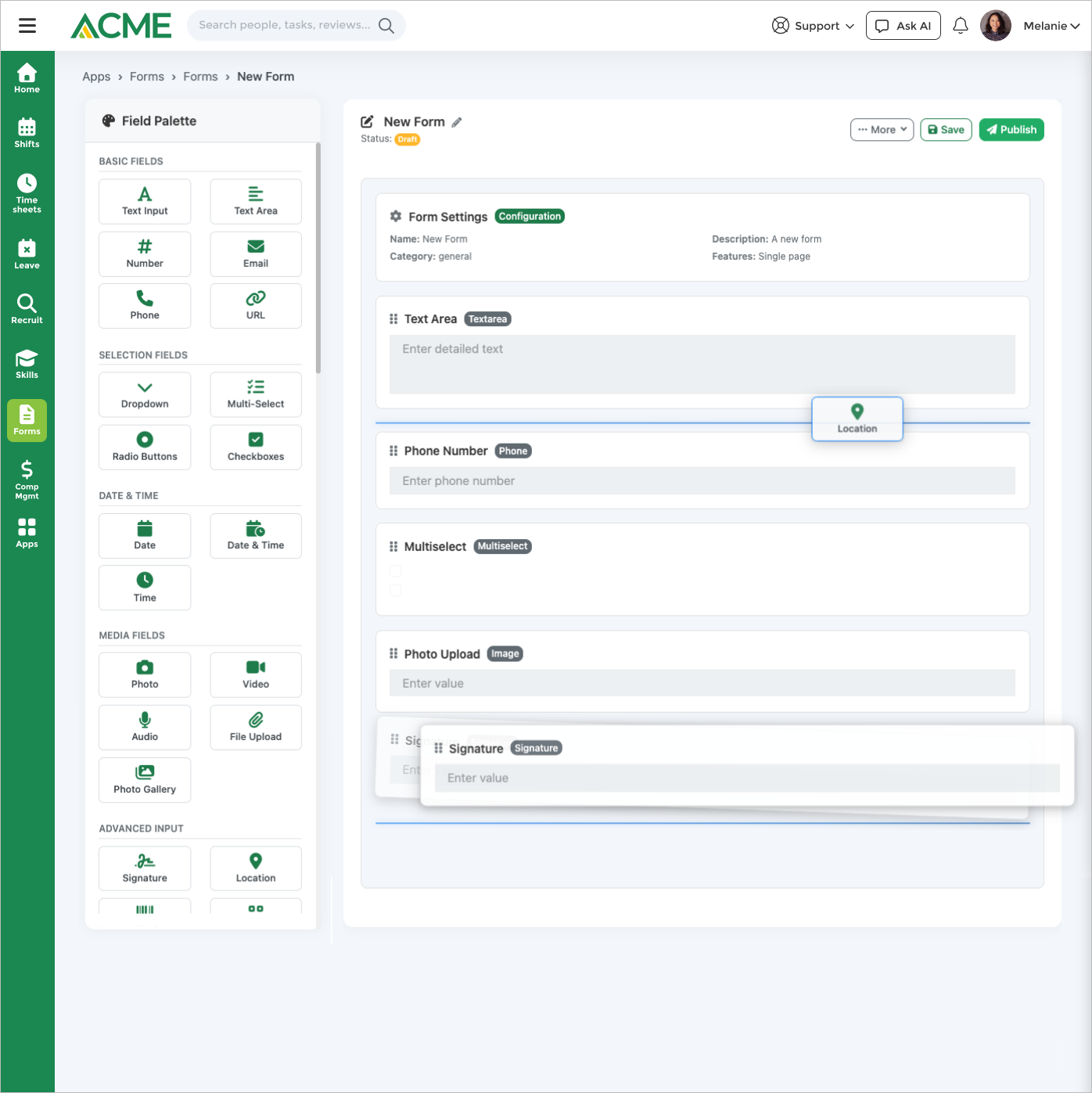
Drag-and-drop builder with 25+ field types — short text, long text, choices, file upload, e-signature, geolocation, date pickers, ratings, and rich-text instructions.
Route Approvals
Multi-step approval workflows with conditional routing — by department, dollar value, location, or any submitted field. Approvers act from email, web, or mobile.
Fire Actions
ActionCue integration converts a submission into the next step of real work — create a task, kick off onboarding, generate an HR case, post an alert.
Track Submissions
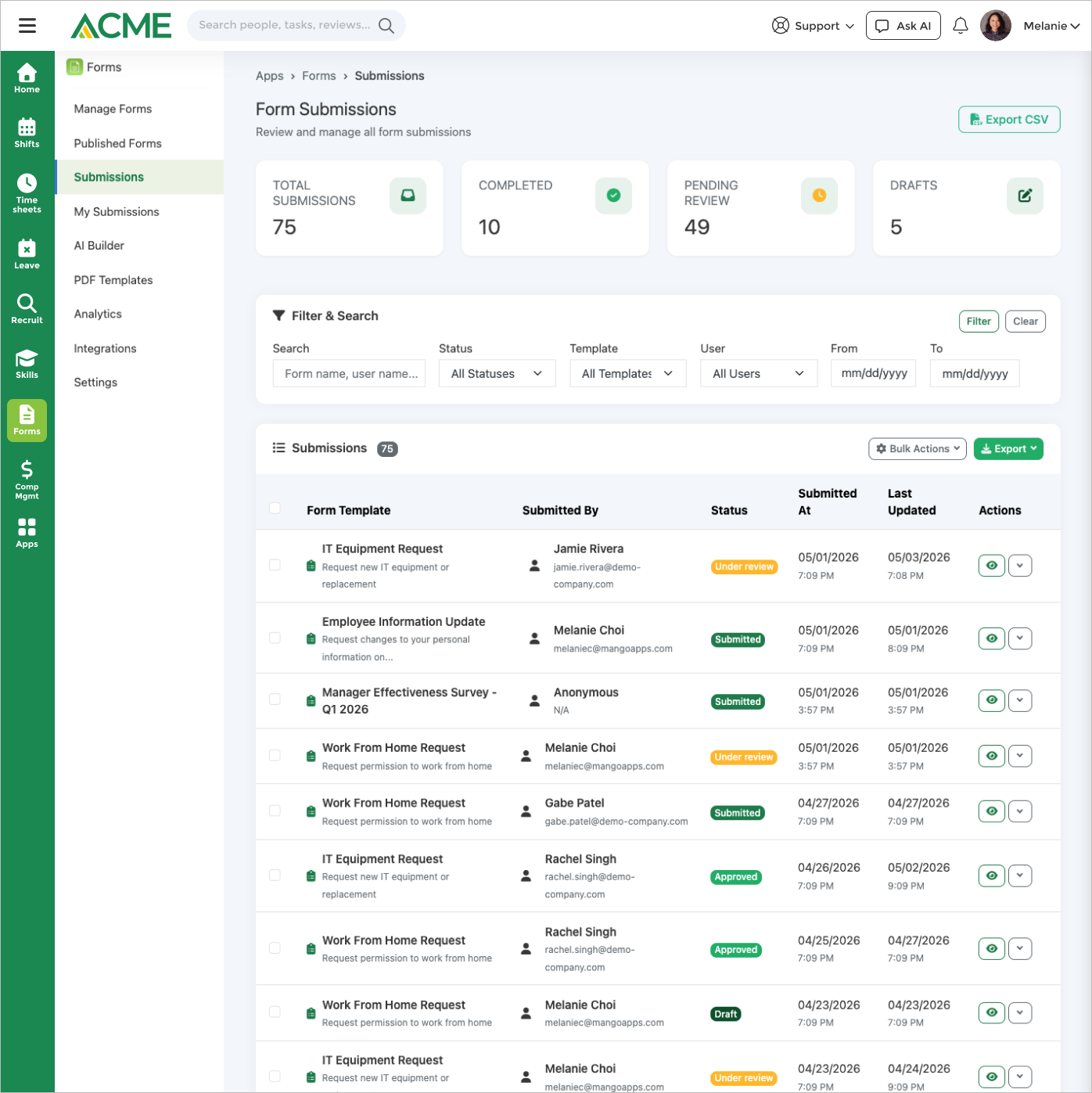
Submission tracking dashboards for owners and approvers. Export to CSV/Excel. Re-open, reassign, or replay a stuck submission.
Built For Real Form Workloads
Forms doesn't just collect fields — it absorbs the workflow around them.

AI Authoring That Actually Builds Production Forms
Three ways in. Describe the form in chat; the AI generates the schema and approval chain. Upload a PDF; the AI detects fields and rebuilds it digitally. Start from a template; tweak the few fields that matter to your business. Every output is a normal Form — fully editable in the builder afterwards.
- Conversational authoring — describe the form, get a working schema.
- PDF import — upload a paper form, get a digital one.
- Template library — start from common patterns (expense, IT request, time off).
- Builder fallback — every AI output is editable in the visual builder.

Conditional Logic And Multi-Step Approvals
Branch the form by previous answers. Route the approval by submitted value (dollar amount, department, location). Loop in multiple approvers in sequence or parallel. The form and the approval are the same artifact — no separate workflow tool needed.
- Show/hide fields, sections, and pages based on prior answers.
- Field validation — required, regex, range, file size, file type.
- Sequential or parallel approvals — with reassignment and comments.
- Approver delegation — out-of-office routing handled.

Submissions That Drive Real Work With ActionCue
A submission is rarely the end — it's usually the start. ActionCue routes submissions into the next step automatically. New hire onboarding forms create onboarding tasks. Incident reports open safety cases. Equipment requests generate purchase tasks. The form becomes the front door to the workflow.
- Task creation — submissions create assigned Tasks with due dates.
- Cross-app routing — onboarding, safety, HR cases, IT requests.
- Webhooks & API — push submissions to external systems.
- Re-entry — failed downstream actions surface for retry.
Forms In Practice
A practical scope check: what the app covers, which controls matter, and the workflows teams usually run first.
Core workflow
Build dynamic forms with AI-powered creation from conversation, PDF uploads, or templates.
Controls that matter
Submissions & Workflow includes Auto-save drafts with cross-device resume and Anonymous and authenticated submissions.
Scope and specs
Useful specs: Max file attachment size: 10 MB (admin-configurable, max 50 MB); Allowed file types: PDF, DOC, DOCX, JPG, JPEG, PNG, GIF; AI PDF/image extraction limit: 512 MB per file.
Incident reporting
Frontline workers submit incident reports with photos and GPS coordinates from their mobile devices, even in low-connectivity areas.
Employee onboarding forms
New hires complete tax forms, emergency contacts, and policy acknowledgments through guided multi-step forms.
Maintenance requests
Facilities teams create request forms with conditional fields that show relevant questions based on the issue category.
Connected To The Rest Of MangoApps
→ Tasks
Submissions auto-create Tasks via ActionCue — assigned, due-dated, and tracked alongside the rest of your team's work.
See Tasks→ E-Signature
Capture legally binding signatures inside the form. E-Signature handles the signing certificate and audit trail.
See E-Signature→ Workspaces
Forms can be scoped per workspace — different audiences see different forms, with submissions visible to the right approver group.
See Workspace→ Comms Hub
Comms Hub can attach a form to a campaign or newsletter — collect responses from a broadcast, see completion rate inline.
See Comms Hub→ Safety Hub
Incident forms feed Safety Hub investigations with photos, witnesses, and severity. Submissions become tracked cases.
See Safety Hub→ Surveys
Use Forms for structured submissions with approvals; use Surveys for anonymous engagement and pulse listening. They share audiences.
See SurveysREPLACES POINT TOOLS
One forms platform in place of three SaaS subscriptions and a PDF folder
Most companies juggle a public-form builder for inbound leads, Microsoft Forms for internal surveys, a PDF-fillable folder for HR/ops paperwork, and email approvals to stitch it all together. Forms collapses that into one app — AI-authored, governed, and wired into workflows.
Typeform
Public-facing form builder with per-response metering
- No per-response pricing — internal and external forms scale without surprise bills
- Forms talk to the rest of MangoApps natively (Tasks, Workspaces, Workflows) — no Zap to maintain
- Conditional logic, e-signature, and approvals included — not paid add-ons
Jotform
General-purpose forms with HIPAA / approval add-ons
- One per-employee license replaces the form tool AND every other workforce app — not stacked SKUs
- Identity, audit, and retention inherited from the platform — Legal already approved it
- AI authoring builds a working form from a sentence — no drag-and-drop assembly
Google Forms
Free survey builder, no workflow attached
- Approvals, conditional logic, e-signature, and submission analytics included by default
- Submissions become real records — Tasks, tickets, drafts — not just rows in a spreadsheet
- Frontline workers without Google accounts can complete forms on the branded mobile app
Microsoft Forms
Forms bolted onto Microsoft 365
- Works for the 80% of your workforce without M365 licenses
- Power Automate is included as a first-class platform — not a separate licensed product
- One audit log across every form, approval, and signature — not split across Forms / Power Automate / SharePoint
Formstack
Workflow-oriented forms with per-form pricing
- Unlimited forms in one license — no "we hit the form cap" conversation
- Approvals, e-signature, and document generation included; not three separate Formstack products
- Forms see the org chart, roles, and locations from HRIS — Formstack's permission model is bolted on
PLATFORM LEVERAGE
Forms inherits everything else MangoApps already does
A standalone form tool has to build, buy, or integrate each of these. Forms gets them for free because the platform already runs them.
Identity & SSO
Internal forms inherit SAML/OIDC SSO, MFA, and SCIM provisioning. Public forms support anonymous + authenticated paths with the same audit.
HRIS-synced routing
Approval routing uses the live org chart, role, location, and manager hierarchy from HRIS — no parallel approval matrix to maintain.
Translation in 100+ languages
Form labels, help text, and confirmations auto-translate using the same Mango Translation layer that powers Chat, SOPs, and Policies.
Audit log & retention
Submissions, edits, signatures, and approvals land in the same audit log and retention policy eDiscovery and Legal already use.
Mobile app & push
Frontline employees fill forms in the same branded mobile app they opened today for shifts and pay — no second app to install.
Workflow & automation
A submission can trigger a Task, a Bot, an e-signature, or a workflow — using the same automation engine as every other app.
INDUSTRY FIT
Built for the industries where forms are the operating system
Forms is the data-capture backbone for organizations whose daily work is initiated by a form — and where the existing form tool keeps falling off the back of the workflow.
Healthcare
Intake, consent, incident reports, and infection-control acknowledgements with HIPAA-aware audit and signature.
Manufacturing
Shift handoff, safety check, near-miss reporting, and quality escalation forms completed on the plant-floor mobile app.
Retail
Store-opening checklists, incident reports, and supplier-visit forms with location-aware routing to district managers.
Financial Services
KYC, account-change, exception-approval, and compliance attestation forms with audit trail and configurable retention.
Public Sector
Citizen requests, internal approvals, and grant-application forms with FedRAMP-eligible deployment and accessibility compliance.
Hospitality
Guest incident reports, brand-audit checklists, and property inspection forms reach housekeeping and front desk without corporate email.
WHY MANGOAPPS WINS
One platform beats a stack of point solutions on every axis
The argument finance, security, IT, and ops all share — and the one a single-purpose form tool structurally cannot answer.
Cheaper than the stack
One per-employee suite license replaces Typeform + Jotform + Formstack + e-signature SaaS — and the bill stops growing per submission.
More secure
One identity perimeter, one audit log, one retention policy across every form, approval, and signature. Nothing for security to re-certify.
Easier to deploy
Already deployed if you have MangoApps. Describe the form, accept the AI draft, publish to a workspace — same day.
Easier to use
Forms live in the same mobile app employees already use for shifts and pay — one login, no friction for the frontline.
Easier to manage
Routing rules use live HRIS data; permissions match the workspace model; no parallel "Forms admin" surface for IT to learn.
Easier to extend
A submission can fire a Task, a Bot, an e-signature, a workflow, or a document — without leaving the platform.
AI is actually better
Forms AI authors a working form from a sentence, helps employees find the right one in chat, and grounds its answers in the actual submissions the user can see — not a vendor-trained model.
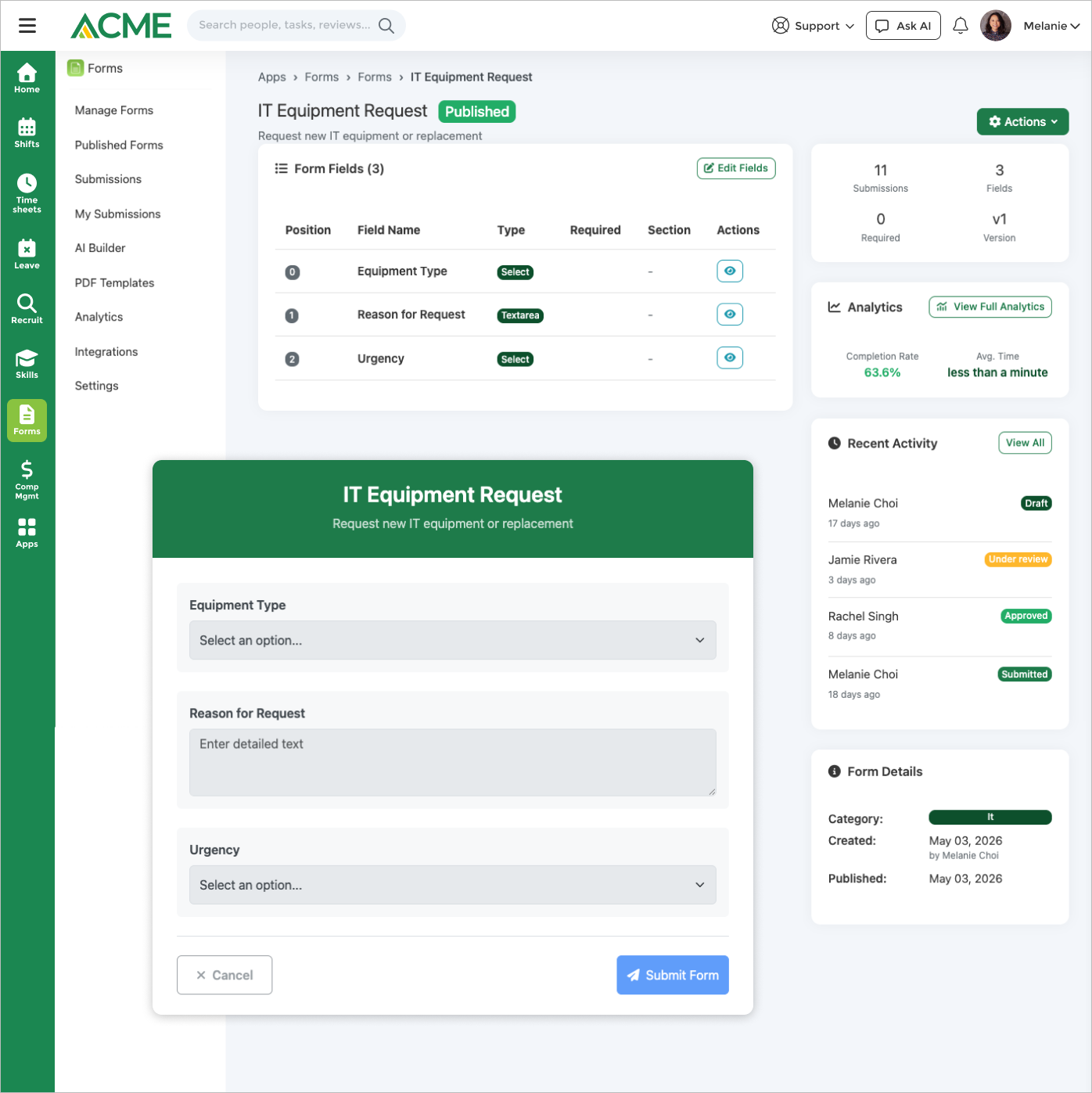
Forms Screenshots
Real product screens from Forms workflows, pulled from the app screenshot gallery.

Pair Forms With AI
Forms AI lets employees find and complete the right form in chat, lets owners track submissions without app-switching, and lets admins build new forms from one-sentence prompts.
Forms AI
9 capabilities across find, submit, track, and AI-author — admin writes role-gated.
Customer Success
How Customers Replace Paper And PDF Forms
 Video Case Studies
 Customer Case Studies
 Customer Case Studies
 Customer Case Studies
 Customer Case Studies
 Customer Case Studies
Our department saves a significant amount of time using Workflow Apps. Before, we probably had 18 to 25 individual Excel spreadsheets out there that we had to manually put together and update, which was extremely time-consuming and inconvenient.

Mark Jones
Director of Litigation and Special Investigations Unit
Shelter Insurance


Frequently Asked Questions
Yes. Upload an existing PDF and Forms detects fields, builds a digital version, and adds approvals. Forms covers structured workloads that Google Forms can't — conditional logic, multi-step approvals, role-based routing, and ActionCue task creation.
Describe what you need in one sentence — "expense reimbursement up to $5K with manager and finance approval" — and the AI Writer generates the schema, fields, logic, and approval chain. Every output is editable in the visual builder afterwards.
ActionCue is the routing layer that turns a submission into the next unit of work. A new-hire form creates onboarding Tasks. An incident form opens a Safety Hub case. A purchase request generates a Tasks workflow. Forms hands off to the right app automatically.
Yes. The e-signature field hands off to E-Signature, which generates the signing certificate and audit trail. Legally binding signatures live in the same form submission record.
Yes. Approval notifications include Approve/Reject buttons that work from email, the iOS/Android app, or the web. Comments and attachments are supported in every surface.
Approver delegation is built in — set a date range and a delegate; pending approvals route to the delegate automatically and revert when the range ends.
The agent finds the right form by description, lets users complete forms in chat, shows submission status, and (for admins) builds new forms from a one-sentence prompt or a sample PDF. See the agent for the full capability list.
Let's Talk
Since 2008, we've been building the workforce platform — earning the trust of 2 million+ users and an NPS of 78.
Why Choose Us?
- AI-Powered Platform: The most unified workforce experience on the planet.
- Top Security: HITRUST, ISO & SOC 2 certified.
- Exceptional UX: Delightful on mobile and desktop.
- Proven Results: 98% customer retention rate.
Trusted by Legendary Companies:
